本文章用的 Notepad++ 编辑器,下载地址 ,butterfly主题版本:Butterfly 5.7.0
查看butterfly主题版本,博客根目录执行
1 cat themes/butterfly/package.json | grep '"version"'
一,页脚添加运行天数 方式一:footer.pug 文件添加,缺点:更新主题会被覆盖
打开主题目录路径,/root/mylog/themes/butterfly/layout/includes,找到 footer.pug 文件,先备份好出现错误方便恢复,然后复制下面代码进去全部替换,这个文件主题更新或是重新拉取会被覆盖,要备份好以便恢复
复制粘贴代码会出现奇奇怪怪的错误,下载文件替换稳妥,页脚设置运行天数文件下载
样式1只显示运行天数和访客
1 2 3 4 5 6 7 8 9 10 11 12 13 14 15 16 17 18 19 20 21 22 23 24 25 26 27 28 29 30 31 32 33 34 35 36 37 38 39 40 41 42 43 44 45 46 47 48 49 50 51 52 53 54 55 56 57 58 59 60 div(style="font-size:13px;margin-bottom:6px;" ) span#timeDate(style="color:#fff;" ) 载入天数... span#times (style="color:#fff;" ) 载入时分秒... div(style="font-size:13px;" ) a(href="javascript:void(0)" onclick="showQR()" style="color:#fff;" ) 公众号 i.fa.fa-heart(style="margin:0 6px;color:#ff6b81;font-size:10px;" ) a(href="这里填网址" target="_blank" rel="nofollow noopener" ) 加入Q群 i.fa.fa-heart(style="margin:0 6px;color:#ff6b81;font-size:10px;" ) span(style="color:#fff;" ) span 访客 span#footer_site_uv 0 i.fa.fa-heart(style="margin:0 6px;color:#ff6b81;font-size:10px;" ) span(style="color:#fff;" ) span 访问 span#footer_site_pv 0 span 次 div(style="position:absolute;top:50%;left:50%;transform:translate(-50%,-50%);background:#fff;padding:20px;border-radius:10px;text-align:center;" ) img(src="/img/图片.png" style="max-width:250px;border-radius:5px;" ) p(style="margin:10px 0 0;color:#333;font-size:14px;" ) 扫码关注公众号 script. var now = new Date(); function createtime var grt = new Date("03/13/2022 00:00:00" ); now.setTime(now.getTime() + 250); days = (now - grt) / 1000 / 60 / 60 / 24; dnum = Math.floor(days); hours = (now - grt) / 1000 / 60 / 60 - (24 * dnum); hnum = Math.floor(hours); if (String(hnum).length == 1) { hnum = "0" + hnum; } minutes = (now - grt) / 1000 / 60 - (24 * 60 * dnum) - (60 * hnum); mnum = Math.floor(minutes); if (String(mnum).length == 1) { mnum = "0" + mnum; } seconds = (now - grt) / 1000 - (24 * 60 * 60 * dnum) - (60 * 60 * hnum) - (60 * mnum); snum = Math.round(seconds); if (String(snum).length == 1) { snum = "0" + snum; } document.getElementById("timeDate" ).innerHTML = "已安全运行 " + dnum + " 天 " ; document.getElementById("times" ).innerHTML = hnum + " 小时 " + mnum + " 分 " + snum + " 秒" ; } setInterval("createtime()" , 250); function showQR document.getElementById("qr-overlay" ).style.display = "block" ; } function hideQR document.getElementById("qr-overlay" ).style.display = "none" ; } function syncBusuanzi var uv = document.getElementById("busuanzi_value_site_uv" ); var pv = document.getElementById("busuanzi_value_site_pv" ); var fuv = document.getElementById("footer_site_uv" ); var fpv = document.getElementById("footer_site_pv" ); if (uv && fuv) fuv.innerHTML = uv.innerHTML; if (pv && fpv) fpv.innerHTML = pv.innerHTML; } setInterval(syncBusuanzi, 1000);
方式二:使用 Butterfly 的 inject 注入 JS,更新主题不会被覆盖
主题随便更新, JS 文件不受影响
1,打开 _config.butterfly.yml ,代码包含了不蒜子统计,搜索 busuanzi 删掉另一个
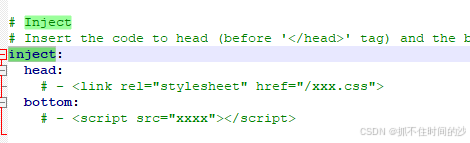
2,搜索 inject head bottom 连在一起的这几个也删掉
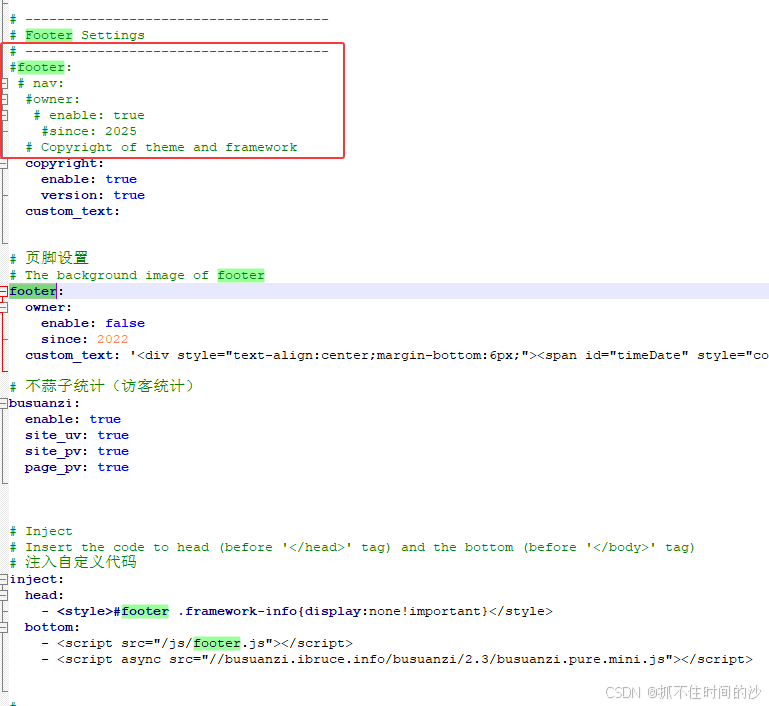
3,搜索 footer 注释掉这几个,在下面添加代码
1 2 3 4 5 6 7 8 9 10 11 12 13 14 15 16 17 18 19 20 21 22 23 24 25 26 footer: owner: enable : false since: 2022 custom_text: '<div style="text-align:center;margin-bottom:6px;"><span id="timeDate" style="color:var(--light-grey);">载入天数...</span><span id="times" style="color:var(--light-grey);">载入时分秒...</span></div><div style="text-align:center;"><a href="javascript:void(0)" onclick="showQR()" style="color:var(--light-grey);">公众号</a><i class="fa fa-heart" style="margin:0 4px;color:#ff6b81;font-size:10px;"></i><a href="https://jq.qq.com/?_wv=1027&k=Rvh2OGC8" target="_blank" rel="nofollow noopener" style="color:var(--light-grey);">加入Q群</a><i class="fa fa-heart" style="margin:0 4px;color:#ff6b81;font-size:10px;"></i><span style="color:var(--light-grey);">访客 <span id="footer_site_uv">0</span></span><i class="fa fa-heart" style="margin:0 4px;color:#ff6b81;font-size:10px;"></i><span style="color:var(--light-grey);">访问 <span id="footer_site_pv">0</span> 次</span></div><div style="text-align:center;margin-top:8px;color:var(--light-grey);font-size:14px;">© 2022 - 2026 By finicb | <a href="https://beian.miit.gov.cn/" target="_blank" rel="noopener" style="color:var(--light-grey);">京ICP备XXXXXXXX号-1</a></div>' busuanzi: enable : true site_uv: true site_pv: true page_pv: true inject: head : - <style>#footer .framework-info{display:none!important}</style> bottom: - <script src="/js/footer.js" ></script> - <script async src="//busuanzi.ibruce.info/busuanzi/2.3/busuanzi.pure.mini.js" ></script>
4,创建 js 文件,在 source/js/ 目录下新建 footer.js,内容如下
1
2
3
4
5
6
7
8
9
10
11
12
13
14
15
16
17
18
19
20
21
22
23
24
25
26
27
28
29
30
31
32
33
34
35
36
37
38
39
40
41
42
43
var now=new Date(); function createtime var grt=new Date("2022-08-02 00:00:00" ); now.setTime(now.getTime()+250); var days=(now-grt)/1000/60/60/24; var dnum=Math.floor(days); var hours=(now-grt)/1000/60/60-24*dnum; var hnum=Math.floor(hours); if (String(hnum).length==1)hnum="0" +hnum; var minutes=(now-grt)/1000/60-24*dnum*60-hnum*60; var mnum=Math.floor(minutes); if (String(mnum).length==1)mnum="0" +mnum; var seconds=(now-grt)/1000-24*dnum*60*60-hnum*60*60-mnum*60; var snum=Math.round(seconds); if (String(snum).length==1)snum="0" +snum; document.getElementById("timeDate" ).innerHTML="本站已运行 " +dnum+" 天 " ; document.getElementById("times" ).innerHTML=hnum+" 小时 " +mnum+" 分 " +snum+" 秒" ; } createtime(); setInterval("createtime()" ,250); // 公众号弹窗 function showQR var modal = document.getElementById("qrModal" ); if (modal){ modal.style.display = modal.style.display === "none" ? "block" : "none" ; }else { var m = document.createElement("div" ); m.id = "qrModal" ; m.style.cssText = "position:fixed;top:50%;left:50%;transform:translate(-50%,-50%);z-index:9999;background:#fff;padding:20px;border-radius:10px;box-shadow:0 0 20px rgba(0,0,0,0.5);text-align:center;" ; m.innerHTML = '<img src="/img/qrcode.jpg" style="width:200px;height:200px;" alt="公众号二维码"><p style="margin-top:10px;color:#333;">扫码关注</p><button onclick="this.parentElement.style.display=\' none\'" style=" margin-top:10px;padding:5px 15px;border:none;background:#ff6b81;color:#fff;border-radius:5px;cursor:pointer;">关闭</button>'; document.body.appendChild(m); } } // 同步不蒜子统计 function updateBusuanzi(){ var uv = document.getElementById(" busuanzi_value_site_uv"); var pv = document.getElementById(" busuanzi_value_site_pv"); if(uv && uv.innerHTML) document.getElementById(" footer_site_uv").innerHTML = uv.innerHTML; if(pv && pv.innerHTML) document.getElementById(" footer_site_pv").innerHTML = pv.innerHTML; } setInterval(updateBusuanzi, 1000);
5,将你的公众号二维码图片命名为 qrcode.jpg,放到 source/img/ 目录下
6,如果想把备案号去掉,修改后面这个位置,上面第3步
1 © 2022 - 2026 By 你的名字 | <a href="https://beian.miit.gov.cn/" target="_blank" rel="noopener" style="color:var(--light-grey);" >随便写写-1</a></div>'
二、安装字数统计插件 1 npm install hexo-wordcount --save
或者使用另一个插件,两个插件选一个安装即可
1 npm install hexo-symbols-count-time --save
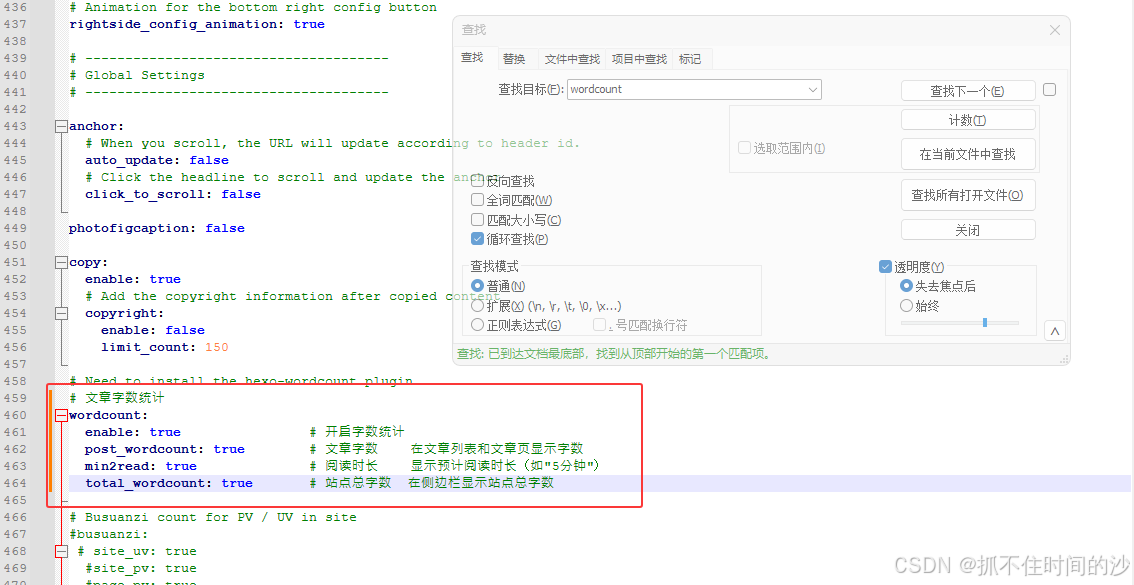
修改主题的配置文件 _config.butterfly.yml ,搜索 wordcount 把原来的删了,下面的替换进去
1 2 3 4 5 6 wordcount: enable : true post_wordcount: true min2read: true total_wordcount: true
1
2
3
4
5
6
7
menu: 首页: / || fas fa-home 文章: /archives/ || fas fa-archive 标签: /tags/ || fas fa-tags 分类: /categories/ || fas fa-folder-open 友链: /link/ || fas fa-link 关于: /about/ || fas fa-user
四、开启友链专属页面 1,在Hexo博客根目录打开终端,执行命令
打开生成的 \source\link\index.md 文件,复制下面的进去
1
2
3
4
5
6
--- title: 友情链接 date : 2025-05-21 17:32:19type : "link" top_img: /img/link_top.jpg ---
2,创建友链数据配置文件
在 source目录下新建 _data 文件夹(若已存在可跳过)
1
2
3
4
5
6
7
8
9
10
11
12
13
14
15
16
17
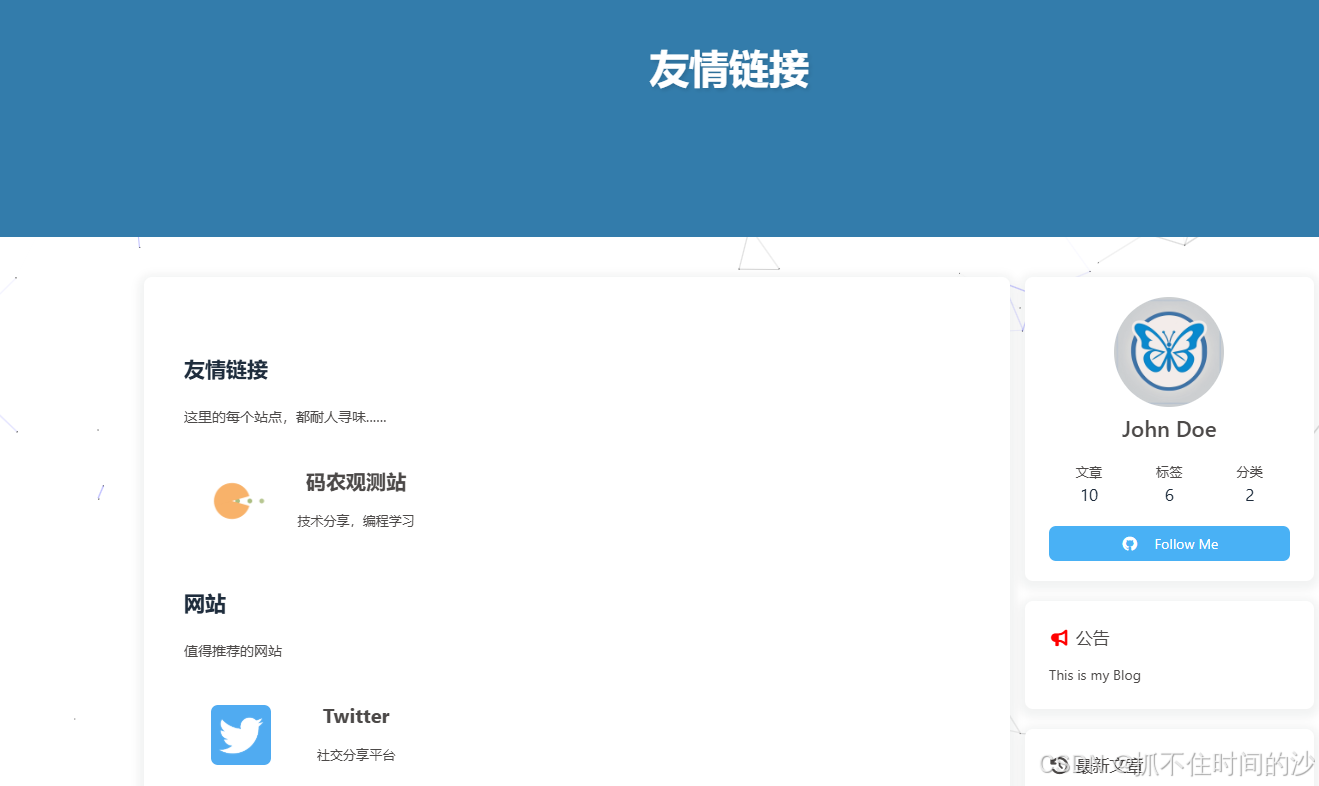
- class_name: 友情链接 class_desc: 这里的每个站点,都耐人寻味…… flink_style: flexcard link_list: - name: 码农观测站 link : https://www.codeobservatory.cn/ avatar: https://www.codeobservatory.cn/img/butterfly-icon.webp siteshot: https://www.codeobservatory.cn/images/shot.png descr: 技术分享,编程学习 - class_name: 网站 class_desc: 值得推荐的网站 link_list: - name: Twitter link : https://twitter.com/ avatar: https://i.loli.net/2020/05/14/5VyHPQqR6LWF39a.png descr: 社交分享平台
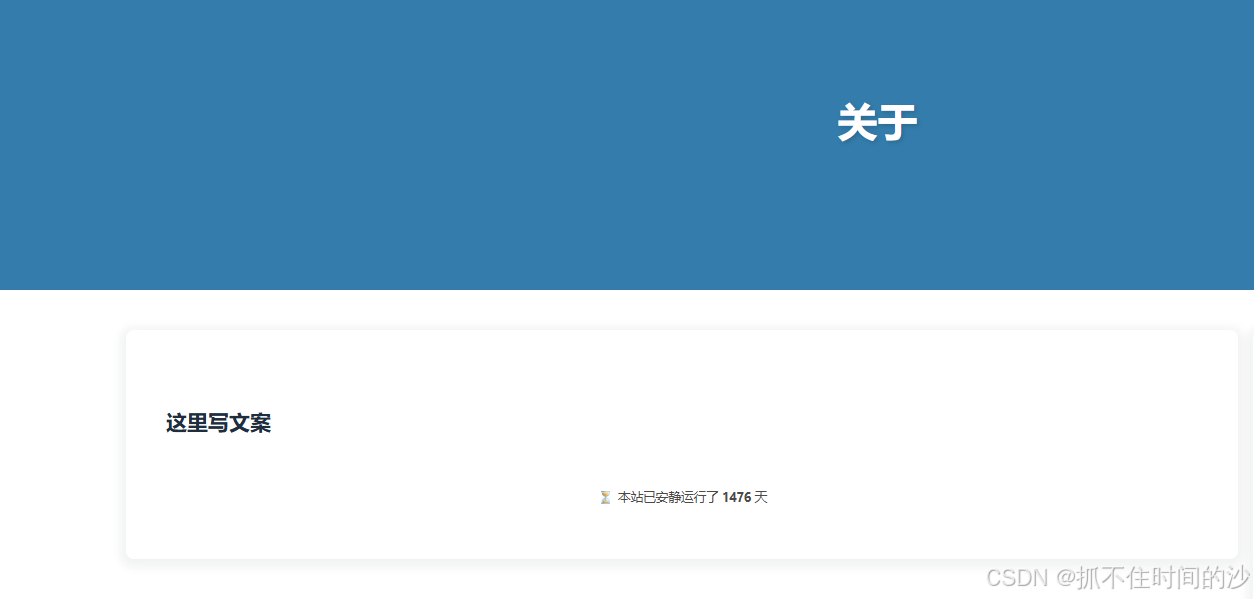
五,关于页加入运行时间 打开关于页目录 source/about/,修改 index.md,添加下面代码
1
2
3
4
5
6
7
8
9
10
11
12
13
14
15
16
17
18
19
20
21
22
23
24
25
26
27
28
29
title: 关于 date : 2024-01-01layout: page top_img: /img/about_top.jpg --- 这里写文案 --- <br> <div style="text-align:center; color:var(--text-gray); font-size:0.9em;" > ⏳ 本站已安静运行了 <strong><span id ="runtime_about" ></span></strong> 天 </div> <script> (function const startDate = new Date("2022/07/31" ); // ✅ 改成你的建站日期 function updateRuntime const now = new Date(); const diff = now.getTime() - startDate.getTime(); const days = Math.floor(diff / (1000 * 60 * 60 * 24)); document.getElementById("runtime_about" ).innerText = days; } updateRuntime(); setInterval(updateRuntime, 60000); })(); </script>
六,开启分类页面 在博客根目录执行
1 hexo new page categories
修改 source\categories 目录下 index.md,添加下面代码
1
2
3
4
5
6
7
--- title: 分类 date : 2023-10-11 20:26:34type : "categories" layout: page top_img: /img/category_top.jpg ---
七,开启标签页面 在博客根目录执行
修改 source\tags 目录下 index.md,添加下面代码
1
2
3
4
5
6
--- title: 标签 type : tagslayout: page top_img: /img/tag_top.jpg ---
八,添加鼠标特效,本地版 在博客根目录执行下面命令,下载 css,js 特效文件到本地
1
2
3
4
5
6
7
8
9
mkdir -p source /css/texiao source /js/texiaocurl -L https://cdn.jsdelivr.net/gh/bynotes/texiao/source/css/toubudaziji.css -o source /css/texiao/toubudaziji.css curl -L https://cdn.jsdelivr.net/gh/bynotes/texiao/source/css/daziyanse.css -o source /css/texiao/daziyanse.css curl -L https://cdn.jsdelivr.net/gh/bynotes/texiao/source/css/gundongtiao.css -o source /css/texiao/gundongtiao.css curl -L https://cdn.jsdelivr.net/gh/bynotes/texiao/source/css/shubiao.css -o source /css/texiao/shubiao.css curl -L https://cdn.jsdelivr.net/gh/bynotes/texiao/source/js/love.js -o source /js/texiao/love.js curl -L https://cdn.jsdelivr.net/gh/bynotes/texiao/source/js/xiantiao.js -o source /js/texiao/xiantiao.js curl -L https://cdn.jsdelivr.net/gh/bynotes/texiao/source/js/dianjichuzi.js -o source /js/texiao/dianjichuzi.js curl -L "https://gcore.jsdelivr.net/npm/canvas-nest.js@1.0.1/dist/canvas-nest.js" -o source /js/texiao/canvas-nest.js
修改主题配置文件 _config.butterfly.yml,找到 inject 部分,添加下面代码
1
2
3
4
5
6
7
8
9
10
11
inject: head : - <link rel="stylesheet" href="/css/texiao/toubudaziji.css" > - <link rel="stylesheet" href="/css/texiao/daziyanse.css" > - <link rel="stylesheet" href="/css/texiao/gundongtiao.css" > - <link rel="stylesheet" href="/css/texiao/shubiao.css" > bottom: - <script src="/js/texiao/love.js" ></script> - <script src="/js/texiao/xiantiao.js" ></script> - <script src="/js/texiao/dianjichuzi.js" ></script> - <script async src="/js/texiao/canvas-nest.js" color="150,200,255" opacity="0.5" zIndex="-1" count="99" ></script>
如果 dianjichuzi.js 文件点击不出字,替换下面内容
1 2 3 4 5 6 7 8 9 10 11 12 13 14 15 16 17 18 19 20 21 22 23 24 25 26 27 28 29 30 31 32 33 34 35 36 37 38 39 40 41 42 43 44 45 46 47 48 (function () { var words = ["富强" , "民主" , "文明" , "和谐" , "自由" , "平等" , "公正" , "法治" , "爱国" , "敬业" , "诚信" , "友善" ]; var idx = 0 ; function initClickText() { if (document.body.dataset.clickTextBound) return ; document.body.dataset.clickTextBound = 'true' ; document.addEventListener('click' , function (e) { var span = document.createElement('span' ); span.textContent = words[idx]; idx = (idx + 1 ) % words.length; var x = e.pageX; var y = e.pageY - 20 ; span.style.cssText = 'z-index:9999;top:' + y + 'px;left:' + x + 'px;position:absolute;font-weight:bold;color:rgb(' + ~~(255 * Math.random()) + ',' + ~~(255 * Math.random()) + ',' + ~~(255 * Math.random()) + ');pointer-events:none;transition:all 3s ease-out;opacity:1;' ; document.body.appendChild(span); requestAnimationFrame(function () { span.style.top = (y - 160 ) + 'px' ; span.style.opacity = '0' ; }); setTimeout(function () { if (span.parentNode) span.parentNode.removeChild(span); }, 3000 ); }); } if (document.readyState === 'loading' ) { document.addEventListener('DOMContentLoaded' , initClickText); } else { initClickText(); } document.addEventListener('pjax:complete' , initClickText); })();
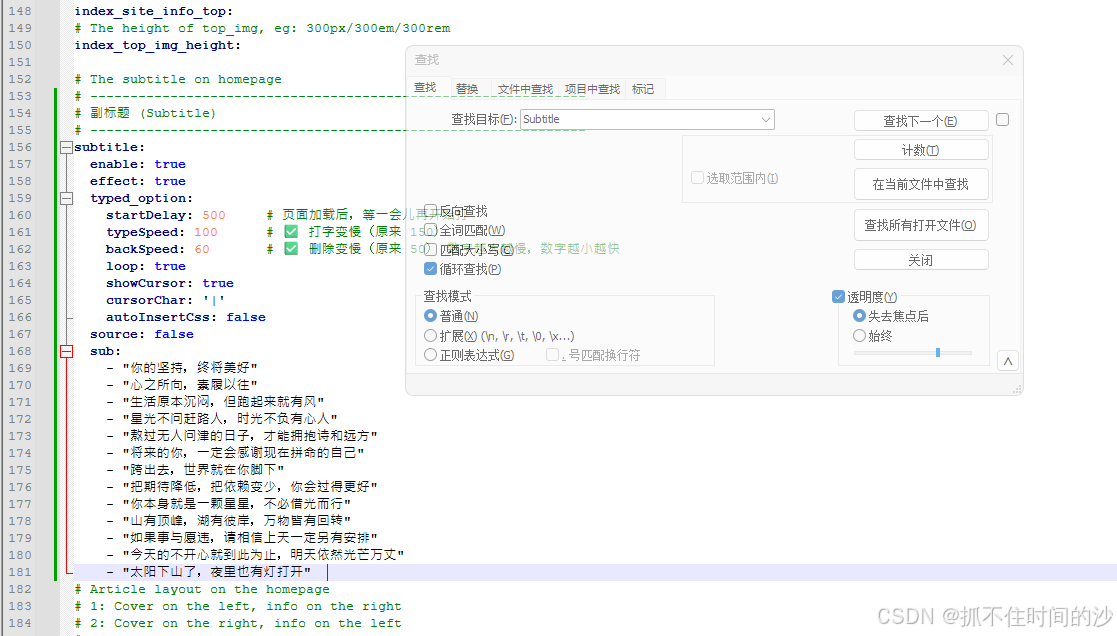
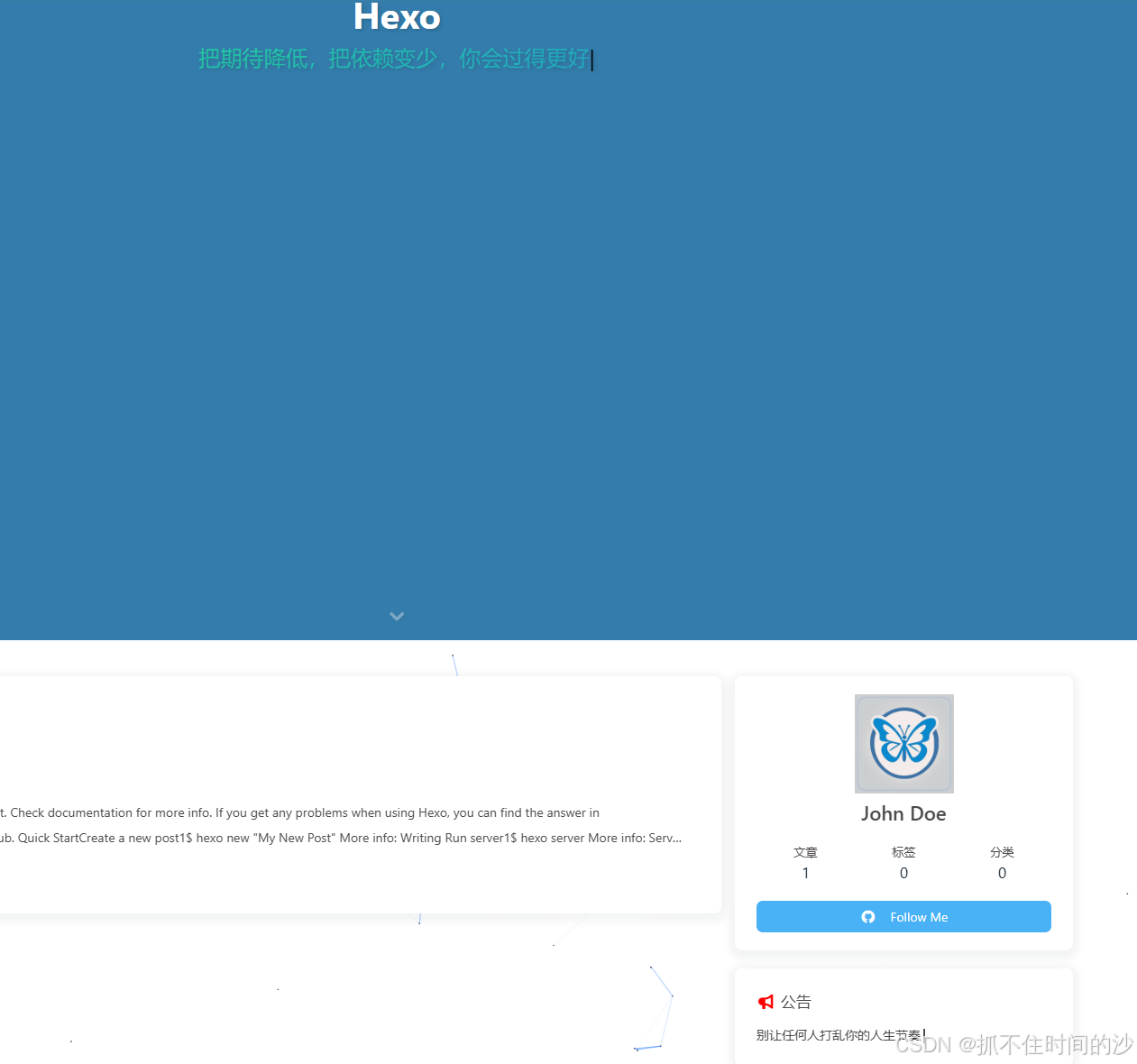
九,首页副标题和侧边栏公告设置打字机效果 1,设置首页副标题打字机,修改主题配置文件 _config.butterfly.yml 搜索 subtitle 直接替换成下面的内容
1 2 3 4 5 6 7 8 9 10 11 12 13 14 15 16 17 18 19 20 21 22 23 24 25 26 27 28 29 subtitle: enable : true effect: true typed_option: startDelay: 500 typeSpeed: 100 backSpeed: 60 loop: true showCursor: true cursorChar: '|' autoInsertCss: false source : false sub: - "你的坚持,终将美好" - "心之所向,素履以往" - "生活原本沉闷,但跑起来就有风" - "星光不问赶路人,时光不负有心人" - "熬过无人问津的日子,才能拥抱诗和远方" - "将来的你,一定会感谢现在拼命的自己" - "跨出去,世界就在你脚下" - "把期待降低,把依赖变少,你会过得更好" - "你本身就是一颗星星,不必借光而行" - "山有顶峰,湖有彼岸,万物皆有回转" - "如果事与愿违,请相信上天一定另有安排" - "今天的不开心就到此为止,明天依然光芒万丈" - "太阳下山了,夜里也有灯打开"
2,在 source/js/ 下新建 announcement-typewriter.js 内容如下
1 2 3 4 5 6 7 8 9 10 11 12 13 14 15 16 17 18 19 20 21 22 23 24 25 26 27 28 29 30 31 32 33 34 35 36 37 38 39 40 41 42 43 44 45 46 47 48 49 50 51 52 53 54 55 56 57 58 59 60 61 62 63 64 65 66 67 68 69 70 71 72 73 74 75 76 77 78 79 80 81 82 83 84 85 86 87 88 89 90 (function var texts = [ "主打一个随心所欲" , "今天的我,比昨天更靠谱一点" , "把日子过成自定义模式" , "慢热长情,也随时能抽身" , "不凑热闹,只守我的节奏" , "心之所向,素履以往" , "你的坚持,终将美好" , "星光不问赶路人,时光不负有心人" , "今天也是被阳光偏爱的一天" , "做自己的太阳,无需凭借谁的光" , "别让任何人打乱你的人生节奏" , "别急,好事总会在下个转弯处等你" ]; // ===== 打字机效果配置 ===== var typeSpeed = 150; // 【打字速度】每个字出现的间隔(毫秒),数值越大打字越慢 // 推荐范围:80~200,160 属于中等偏慢,比较从容 var deleteSpeed = 90; // 【删除速度】每个字被删除的间隔(毫秒),数值越大删除越慢 // 推荐范围:60~150,90 属于较快,删除干净利落 var holdDelay = 2600; // 【停留延迟】一句话打完后停留的时间(毫秒) // 2600ms = 2.6 秒,结束后才开始删除并打出下一句 // 推荐范围:1500~4000 // 全局保存定时器,PJAX 重新执行前清除旧的 var typeTimer = null; function initTypewriter // 清除之前的定时器 if (typeTimer) { clearTimeout(typeTimer); typeTimer = null; } var el = document.getElementById('announcement-typed' ); if (!el) return ; // ✅ 只负责文字,不负责光标 el.style.display = 'inline-block' ; el.style.minHeight = '1.5em' ; el.style.lineHeight = '1.5' ; el.style.verticalAlign = 'baseline' ; el.style.position = 'relative' ; var textIndex = 0; var charIndex = 0; var isDeleting = false ; function tick var current = texts[textIndex]; if (!isDeleting) { el.textContent = current.substring(0, charIndex + 1); charIndex++; if (charIndex === current.length) { isDeleting = true ; typeTimer = setTimeout(tick, holdDelay); return ; } typeTimer = setTimeout(tick, typeSpeed); } else { el.textContent = current.substring(0, charIndex - 1); charIndex--; if (charIndex === 0) { isDeleting = false ; textIndex = (textIndex + 1) % texts.length; typeTimer = setTimeout(tick, 500); return ; } typeTimer = setTimeout(tick, deleteSpeed); } } typeTimer = setTimeout(tick, 600); } // 页面加载时执行 if (document.readyState === 'loading' ) { document.addEventListener('DOMContentLoaded' , initTypewriter); } else { initTypewriter(); } // PJAX 切换页面后重新执行 document.addEventListener('pjax:complete' , initTypewriter); })();
3,在 source/css/ 目录下新建 announcement-typewriter.css 内容如下
1
2
3
4
5
6
7
8
9
10
11
12
13
14
15
16
17
18
19
20
21
22
23
24
25
26
27
28
29
30
/* ========== 公告栏容器 ========== */ display: inline-block; min-height: 1.5em; line-height: 1.5; } /* ========== 公告栏光标(黑色竖线,闪烁) ========== */ content: '' ; display: inline-block; width: 2px; height: 1.2em; /* ← 这个就是光标高度 想和文字一样高 → 改成 1em*/ background-color: margin-left: 3px; vertical-align: text-bottom; position: relative; top: 0.05em; animation: announcement-blink 1s step-end infinite; } @keyframes announcement-blink { 0%, 100% { opacity: 0; } 50% { opacity: 0.7; } } /* 暗黑模式也保持黑色 */ [data-theme="dark" ] background-color: }
4,在 source/css/ 目录下新建 subtitle-typewriter.css (首页副标题光标)
1
2
3
4
5
6
7
8
9
10
11
12
13
14
15
16
17
18
19
20
21
/* ========== 首页副标题打字机光标 → 强制黑色 ========== */ .typed-cursor, .subtitle .typed-cursor { color: opacity: 1 !important; animation: subtitle-blink 1s infinite !important; font-weight: normal !important; } @keyframes subtitle-blink { 0%, 100% { opacity: 1; } 50% { opacity: 0; } } /* 暗黑模式下也强制黑色 */ [data-theme="dark" ] .typed-cursor, [data-theme="dark" ] color: }
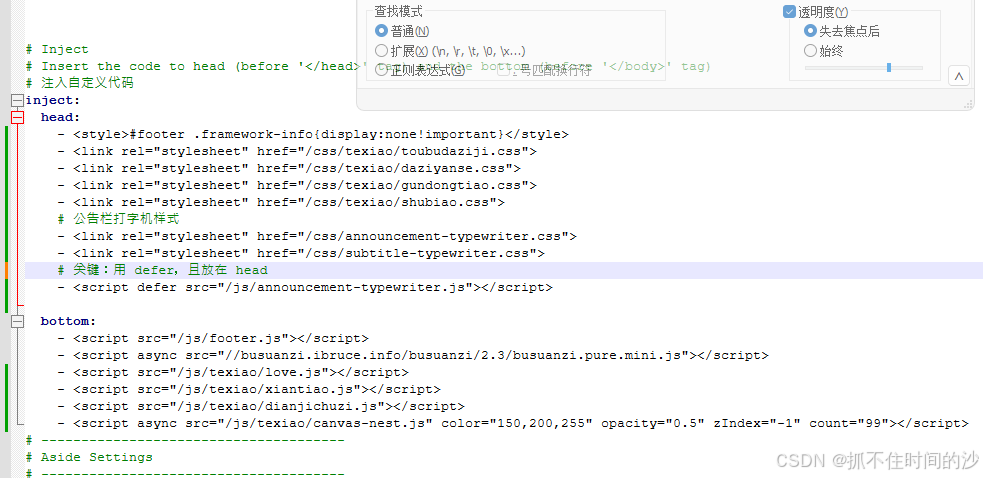
5,打开 _config.butterfly.yml,找到 inject.head 复制下面的进去
1
2
3
4
5
6
7
inject: head : - <link rel="stylesheet" href="/css/announcement-typewriter.css" > - <link rel="stylesheet" href="/css/subtitle-typewriter.css" > - <script defer src="/js/announcement-typewriter.js" ></script>
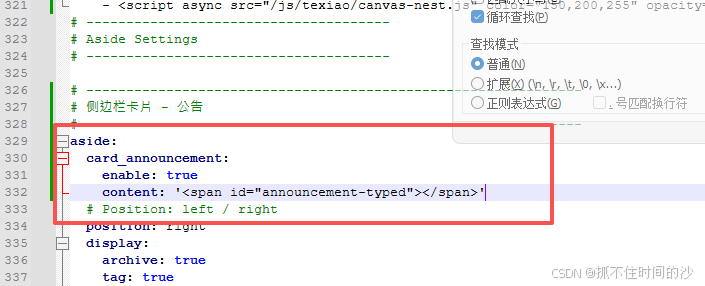
1 2 3 4 5 6 7 aside: card_announcement: enable : true content: '<span id="announcement-typed"></span>'
十,背景特效修改,用这里主题自带的特效就不要用本地版,也就是上面第八步,两个不要同时用,会重叠,本地版 js 和 css 文件可以留着不删,inject 里注释掉就行 1,打开 _config.butterfly.yml 搜索 Background effects 替换下面的进去
1 2 3 4 5 6 7 8 9 10 11 12 13 14 15 16 17 18 19 20 21 22 23 24 25 26 27 28 29 30 31 32 33 34 35 36 37 38 39 40 41 42 43 44 45 46 47 48 49 50 51 52 53 54 55 56 57 58 59 60 61 62 63 64 65 66 67 68 69 70 71 72 canvas_ribbon: enable : false size: 100 alpha: 0.3 zIndex: -1 click_to_change: false mobile: false canvas_nest: enable : true color: '150,180,255' opacity: 0.8 count: 150 zIndex: -1 mobile: false canvas_fluttering_ribbon: enable : false mobile: false fireworks: enable : false zIndex: 9999 mobile: false click_heart: enable : true mobile: false clickShowText: enable : true text: - 随心 - 拾光 - 你好呀 - 慢一点 - ✨ - 光来了 fontSize: 15px random: true mobile: false
2,常用切换组合
组合 A:彩带 + 点击出文字
1
2
3
4
5
6
7
8
9
10
11
12
13
14
15
16
17
18
19
20
21
canvas_ribbon: enable : true size: 100 alpha: 0.3 zIndex: -1 click_to_change: false mobile: false canvas_nest: enable : false clickShowText: enable : true text: - 随心 - 拾光 - 慢一点 - ✨ fontSize: 15px random: false mobile: false
组合 B:星空连线 + 点击烟花(科技感)
1
2
3
4
5
6
7
8
9
10
11
12
13
14
canvas_ribbon: enable : false canvas_nest: enable : true color: '150,180,255' opacity: 0.4 count: 60 mobile: false fireworks: enable : true zIndex: 9999 mobile: false
十一,文章分享功能 addThis、sharejs、addtoany三个选一个开启
addThis官网:https://www.addthis.com/
在 _config.butterfly.yml 里 搜索 share 下面的替换进去
1 2 3 4 5 6 7 8 9 10 11 12 13 14 15 16 17 18 19 20 addThis: enable : false pubid: sharejs: enable : true sites: facebook,twitter,wechat,weibo,qq addtoany: enable : false item: facebook,twitter,wechat,sina_weibo,facebook_messenger,email,copy_link
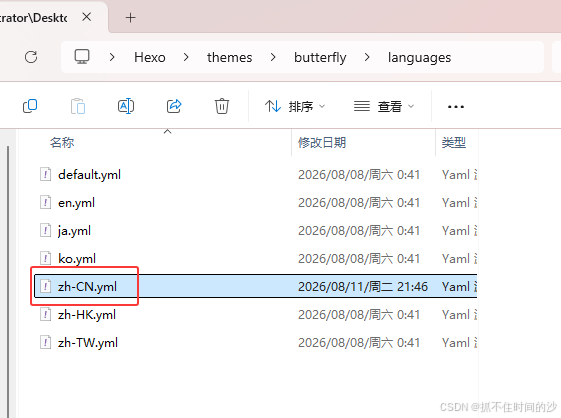
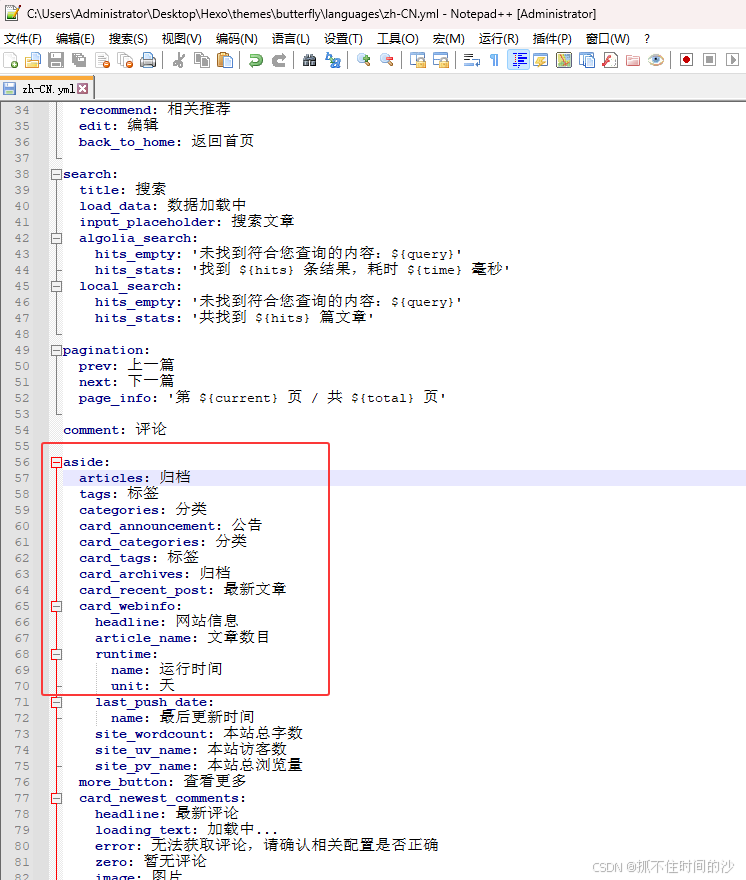
十二,修改侧边栏标签名字 打开目录 Hexo\themes\butterfly\languages,修改 zh-CN.yml
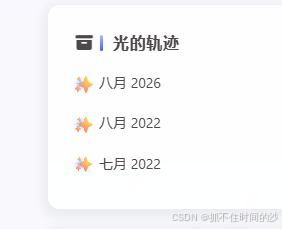
十三,侧边栏归档加入星星特效 1,修改 source\css 目录下 custom.css,添加下面代码
1
2
3
4
5
6
7
8
9
10
11
12
13
14
15
16
17
18
19
20
21
22
23
24
25
26
27
28
29
30
31
32
33
34
35
36
37
38
39
40
41
42
43
44
45
46
47
48
49
50
51
52
53
54
55
56
57
58
59
60
/* ========================= 光的轨迹 · 最终纯净版 (无 CSS 动画,交给 JS 慢呼吸) ========================= */ /* 防止侧边栏裁切 */ overflow: visible !important; } /* 归档标题左侧渐变竖线 */ position: relative; padding-left: 0.8rem !important; display: inline-block; } content: '' ; position: absolute; left: 0; top: 50%; transform: translateY(-50%); width: 3px; height: 1em; background: linear-gradient(180deg, border-radius: 2px; } /* ===== 只对归档卡片(光的轨迹)生效 ===== */ position: relative; display: block; padding-left: 1.6rem !important; margin-bottom: 8px !important; transition: transform 0.35s ease !important; color: var(--text-color) !important; } /* 用 !important 强制覆盖原来的圆点样式 */ content: '★' !important; position: absolute !important; left: 2px !important; top: 50% !important; transform: translateY(-50%) scale(0.8) !important; font-size: 14px !important; color: text-shadow: 0 0 6px rgba(63, 94, 251, 0.6), 0 0 12px rgba(63, 94, 251, 0.3) !important; line-height: 1 !important; background: none !important; /* 去掉原来的背景渐变 */ width: auto !important; /* 去掉原来的宽高 */ height: auto !important; border-radius: 0 !important; /* 去掉圆角 */ box-shadow: none !important; /* 去掉原来的阴影 */ margin-top: 0 !important; /* 重置原来的 margin */ }
2,在 source\js 目录新建 glow-effects.js 添加下面代码
1 2 3 4 5 6 7 8 9 10 11 12 13 14 15 16 17 18 19 20 21 22 23 24 25 26 27 28 29 30 31 32 33 34 35 36 37 38 39 40 41 42 43 44 45 46 47 48 49 50 51 52 53 54 55 56 57 58 59 60 61 62 63 64 65 66 67 68 69 (function // 慢呼吸参数(核心) const SPEED = 0.006; // 越小越慢(0.008 = 极慢治愈) const MIN_OPACITY = 0.45; const MAX_OPACITY = 1; const MIN_SCALE = 0.88; const MAX_SCALE = 1.18; function init var aside = document.querySelector('#aside-content' ); if (!aside) return ; // 找归档卡片 var card = null; aside.querySelectorAll('*' ).forEach(function (el) { var t = (el.innerText || '' ).trim(); if (t === '光的轨迹' || t === '归档' || t === 'Archive' ) { card = el.closest('.card-widget, div[id], section' ) || el.parentElement; } }); if (!card) return ; // 给每个链接加星星(真实 DOM,主题压不住) card.querySelectorAll('a' ).forEach(function (a, i) { if (a.dataset.slowGlow) return ; a.dataset.slowGlow = 'true' ; a.style.position = 'relative' ; a.style.paddingLeft = '1.6rem' ; var dot = document.createElement('span' ); dot.className = 'slow-glow-dot' ; dot.textContent = '✨' ; dot.style.cssText = ` position:absolute;left:0;top:50%; transform:translateY(-50%) scale(0.9); font-size:16px;line-height:1; pointer-events:none;user-select:none; transition:none; `; a.appendChild(dot); }); // 呼吸动画 var dots = card.querySelectorAll('.slow-glow-dot' ); if (!dots.length) return ; function breathe var t = Date.now() * SPEED; dots.forEach(function (d, i) { var phase = t + i * 0.5; var opacity = MIN_OPACITY + (MAX_OPACITY - MIN_OPACITY) * (0.5 + 0.5 * Math.sin(phase)); var scale = MIN_SCALE + (MAX_SCALE - MIN_SCALE) * (0.5 + 0.5 * Math.sin(phase + 1.2)); d.style.opacity = opacity; d.style.transform = 'translateY(-50%) scale(' + scale + ')' ; }); requestAnimationFrame(breathe); } breathe(); } if (document.readyState === 'loading' ) { document.addEventListener('DOMContentLoaded' , init); } else { init(); } // PJAX 切换页面后重新初始化星星 document.addEventListener('pjax:complete' , init); })();
3,修改主题配置文件 _config.butterfly.yml,找到 inject 部分,添加
1
2
3
4
5
6
inject: head : - <link rel="stylesheet" href="/css/custom.css" > - bottom: - <script src="/js/glow-effects.js" ></script>
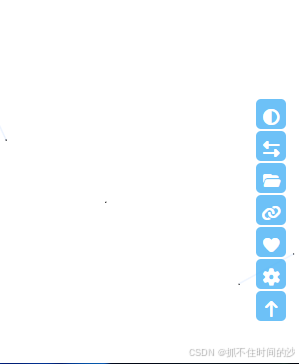
十四,右下角添加自定义按钮,往齿轮面板里加按钮 方式一:添加 js ,css文件 inject.bottom 引入,更新主题或是重新拉取,不会被覆盖
1,在 themes/butterfly/source/js/ 下新建 gear-custom-btn.js,内容如下
1 2 3 4 5 6 7 8 9 10 11 12 13 14 15 16 17 18 19 20 21 22 23 24 25 26 27 28 29 30 31 32 33 34 35 36 37 38 39 40 41 42 43 44 45 46 47 48 49 50 51 52 53 54 55 56 57 58 59 60 61 62 63 64 65 66 67 68 69 70 (function function addExtraBtns var panel = document.getElementById('rightside-config-hide' ); if (!panel) return ; // ===== 按钮1:分类 → 内部打开 ===== if (!document.getElementById('gear-btn-categories' )) { var btn1 = document.createElement('button' ); btn1.id = 'gear-btn-categories' ; btn1.type = 'button' ; btn1.title = '分类' ; btn1.setAttribute('data-pjax' , '' ); btn1.innerHTML = '<i class="fas fa-folder-open"></i>' ; // 改图标 btn1.onclick = function (e) { e.stopPropagation(); var url = '/categories/' ; if (window.pjax && window.pjax.loadUrl) { window.pjax.loadUrl(url); // pjax 无刷新内部跳转 } else { location.href = url; // 普通内部跳转 } }; panel.appendChild(btn1); } // ===== 按钮2:友链 → 内部打开 ===== if (!document.getElementById('gear-btn-link' )) { var btn2 = document.createElement('button' ); btn2.id = 'gear-btn-link' ; btn2.type = 'button' ; btn2.title = '友链' ; btn2.setAttribute('data-pjax' , '' ); btn2.innerHTML = '<i class="fas fa-link"></i>' ; // 改图标 btn2.onclick = function (e) { e.stopPropagation(); var url = '/link/' ; if (window.pjax && window.pjax.loadUrl) { window.pjax.loadUrl(url); // pjax 无刷新内部跳转 } else { location.href = url; // 普通内部跳转 } }; panel.appendChild(btn2); } // ===== 按钮3:拾光 → 新窗口打开 ===== if (!document.getElementById('gear-btn-shiguang' )) { var btn3 = document.createElement('button' ); btn3.id = 'gear-btn-shiguang' ; btn3.type = 'button' ; btn3.title = '拾光' ; btn3.innerHTML = '<i class="fas fa-heart"></i>' ; // 爱心 btn3.onclick = function (e) { e.stopPropagation(); window.open('https://www.baidu.com/' , '_blank' ); // 新窗口打开 }; panel.appendChild(btn3); } } // 首次加载 if (document.readyState === 'loading' ) { document.addEventListener('DOMContentLoaded' , addExtraBtns); } else { addExtraBtns(); } // pjax 跳转后重新补上 document.addEventListener('pjax:complete' , addExtraBtns); })();
2,加点样式让它好看,在 themes/butterfly/source/css/ 新建 _custom.styl 内容如下
1 2 3 4 5 6 7 8 9 10 11 12 13 14 15 16 17 18 19 20 21 [id ^="gear-btn-" ] { width: 32px; height: 32px; border: none; border-radius: 8px; background: transparent; cursor: pointer; display: flex; align-items: center; justify-content: center; margin: 4px 0; padding: 0; color: font-size: 16px; transition: all 0.3s ease; } [id ^="gear-btn-" ]:hover { background: rgba(255, 255, 255, 0.2); transform: scale(1.1); }
3,打开 _config.butterfly.yml,找到 inject.bottom,加上这一行
1
2
3
inject: bottom: - <script src="/js/gear-custom-btn.js" ></script>
Butterfly 主题会自动加载 _custom.styl 无需手动引入
4,部分图标类型,更多免费图标
修改图标路径 source\js\ 目录下 gear-custom-btn.js
1
2
3
4
5
6
7
8
9
10
11
12
13
14
// 分类按钮 btn1.innerHTML = '<i class="fas fa-folder-open"></i>' ; // 友链按钮 btn2.innerHTML = '<i class="fas fa-link"></i>' ; // 拾光按钮(用爱心) btn3.innerHTML = '<i class="fas fa-heart"></i>' ; // 想加"关于" 按钮 btn4.innerHTML = '<i class="fas fa-user"></i>' ; // 想加"归档" 按钮 btn5.innerHTML = '<i class="fas fa-archive"></i>' ;
🌐 品牌图标(社交链接用,前缀 fab)
1
2
3
4
5
6
7
8
9
10
11
12
13
14
15
16
17
平台 图标类名 GitHub fab fa-github 微信 fab fa-weixin QQ fab fa-qq 微博 fab fa-weibo 知乎 fab fa-zhihu B 站 fab fa-bilibili 抖音 fab fa-tiktok 邮箱 fas fa-envelope RSS fas fa-rss Twitter/X fab fa-twitter YouTube fab fa-youtube Instagram fab fa-instagram Facebook fab fa-facebook Telegram fab fa-telegram Discord fab fa-discord 掘金 fas fa-microchip (FA 免费版无掘金品牌图标,可用替代)
常用图标类名(直接替换)
1
2
3
4
5
6
7
8
9
10
11
12
13
fas fa-home 首页 fas fa-folder-open 分类 fas fa-tags 标签 fas fa-link 友链 fas fa-user 关于 fas fa-heart 爱心 fas fa-star 星星 fas fa-gem 宝石 fas fa-fire 火焰 fas fa-bolt 闪电 fas fa-music 音乐 fas fa-camera 相机 fas fa-rocket 火箭
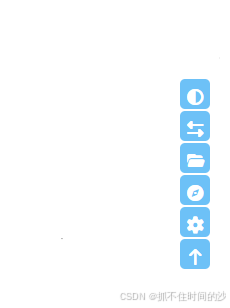
方式二:修改主题文件,更新主题会被覆盖
1,打开 主题目录 themes\butterfly\layout\includes 修改 rightside.pug 里面内容全删,替换下面的进去
1
2
3
4
5
6
7
8
9
10
11
12
13
14
15
16
17
18
19
20
21
22
23
24
25
26
27
28
29
30
31
32
33
34
35
36
37
38
39
40
41
42
43
44
45
46
47
48
49
50
51
52
53
54
55
56
57
58
59
60
61
- const { readmode, translate, darkmode, aside, chat } = theme mixin rightsideItem(array) each item in array case item when 'readmode' if globalPageType === 'post' && readmode button#readmode(type ="button" title=_p('rightside.readmode_title' )) i.fas.fa-book-open when 'translate' if translate.enable button#translateLink(type ="button" title=_p('rightside.translate_title' ))= translate.default when 'darkmode' if darkmode.enable && darkmode.button button#darkmode(type ="button" title=_p('rightside.night_mode_title' )) i.fas.fa-adjust when 'hideAside' if aside.enable && aside.button && page.aside !== false button#hide-aside-btn(type ="button" title=_p('rightside.aside' )) i.fas.fa-arrows-alt-h when 'toc' if showToc button#mobile-toc-button.close(type ="button" title=_p("rightside.toc" )) i.fas.fa-list-ul when 'chat' if chat.rightside_button && chat.use button#chat-btn(type ="button" title=_p("rightside.chat" ) style="display:none" ) i.fas.fa-message when 'categories' button#rightside-categories(type ='button' title='分类' onclick="window.pjax?pjax.loadUrl('/categories/'):location.href='/categories/'" data-pjax) i.fas.fa-folder-open when 'custom' if theme.rightside_custom && theme.rightside_custom.enable button#rightside-custom(type ='button' title=theme.rightside_custom.title onclick="window.pjax?pjax.loadUrl('" +theme.rightside_custom.url+"'):location.href='" +theme.rightside_custom.url+"'" data-pjax) i(class=theme.rightside_custom.icon) when 'comment' if commentsJsLoad a#to_comment(href="#post-comment" title=_p("rightside.scroll_to_comment" )) i.fas.fa-comments - const { enable , hide, show } = theme.rightside_item_order - const hideArray = enable && hide ? hide.split(',' ) : ['readmode' ,'translate' ,'darkmode' ,'hideAside' ,'categories' ,'custom' ] - const showArray = enable && show ? show.split(',' ) : ['toc' ,'chat' ,'comment' ] - const needCogBtn = (enable && hide) || (!enable && ((globalPageType === 'post' && (readmode || translate.enable || (darkmode.enable && darkmode.button))) || (translate.enable || (darkmode.enable && darkmode.button)))) if hideArray.length +rightsideItem(hideArray) if needCogBtn button#rightside-config(type ="button" title=_p("rightside.setting" )) i.fas.fa-cog(class=theme.rightside_config_animation ? 'fa-spin' : '' ) if showArray.length +rightsideItem(showArray) button#go-up(type ="button" title=_p("rightside.back_to_top" )) span.scroll-percent i.fas.fa-arrow-up
2,打开 _config.butterfly.yml 在最下面找个位置,复制下面的进去
1 2 3 4 5 6 rightside_custom: enable : true title: '我的导航' url: 'https://www.baidu.com/' icon: 'fas fa-compass'
十五,添加背景渐变效果 1,打开 source\css 目录,新建 gradient-bg.css 内容如下
1 2 3 4 5 6 7 8 9 10 11 12 13 14 15 16 17 18 19 20 21 22 23 24 25 26 27 28 29 30 31 32 33 34 35 36 37 38 39 40 41 42 43 44 45 46 47 48 49 50 #web_bg { background: none !important; } body { background: linear-gradient(135 deg, #a1c4fd 0 %, #c2e9fb 100 %); background-attachment: fixed; background-size: cover; }
2,打开 _config.butterfly.yml 找到 iniject 加入下面内容
1
2
3
4
inject: head: # 渐变背景 - <link rel="stylesheet" href="/css/gradient-bg.css" >
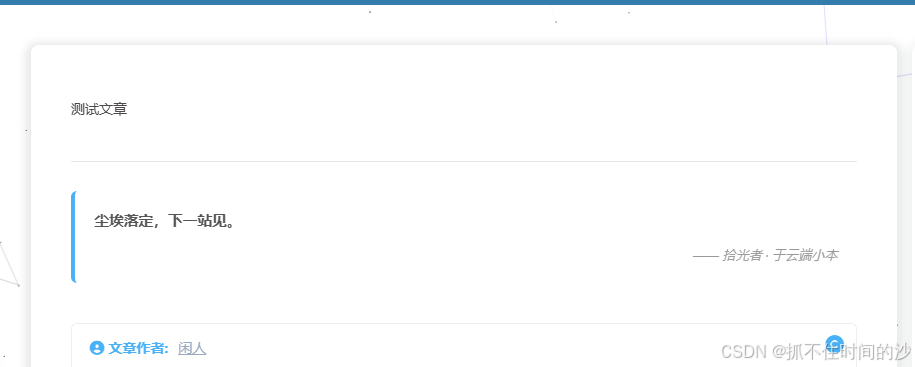
十六,添加文章结尾固定文案 1,在 source\js 目录新建 post-end.js 文件,内容如下
1
2
3
4
5
6
7
8
9
10
11
12
13
14
15
16
17
18
19
20
21
22
23
24
25
26
27
28
(function () { function addPostEnd() { var post = document.querySelector('.post-content' ); if (!post) return ; if (document.querySelector('.post-end-fixed' )) return ; var box = document.createElement('div' ); box.className = 'post-end-fixed' ; box.innerHTML = ` <hr class="post-end-hr" > <blockquote class="post-end-quote" > <p><strong>尘埃落定,下一站见。</strong></p> <footer>—— 拾光者 · 于云端小本</footer> </blockquote> `; post.after(box); } if (document.readyState === 'loading' ) { document.addEventListener('DOMContentLoaded' , addPostEnd); } else { addPostEnd(); } document.addEventListener('pjax:complete' , addPostEnd); })();
2,在 source\css 目录下的 custom.css 加入下面内容
1 2 3 4 5 6 7 8 9 10 11 12 13 14 15 16 17 18 19 20 21 22 23 24 25 26 27 28 29 30 31 32 33 34 .post-end-fixed{ margin-top: 2.4 rem; } .post-end-hr{ border: none; border-top: 1 px solid var (--hr-border-color, #e6e6e6) ; margin: 1.8 rem 0 ; } .post-end-quote{ margin: 1.6 rem 0 ; padding: 1 rem 1.2 rem; background: var(--card-bg, #fafafa); border-left: 4 px solid var(--theme-color, #49b 1f5); border-radius: 6 px; color: var(--text-color, #555 ); font-size: .92 rem; line-height: 1.8 ; } .post-end-quote p{ margin: 0 ; font-weight: 500 ; } .post-end-quote footer{ margin-top: .6 rem; font-size: .82 rem; color: var(--text-color-light, #999 ); text-align: right; font-style: italic; }
3,打开 _config.butterfly.yml 找到 iniject 加入下面内容
1
2
3
4
5
6
7
inject: head: # 文章结尾固定文字 - <link rel="stylesheet" href="/css/custom.css" > bottom: # 文章结尾固定文字 - <script src="/js/post-end.js" ></script>
十七,添加音乐播放器和 Live2D 看板娘 1,侧边添加音乐播放器看这里
2,添加Live2D 看板娘看这里




 微信
 支付宝